
The Bulb That Broke Your Wi-Fi: How Wrong Light Bulbs Disrupt Your Garage Door Opener
You installed a smart garage door opener. The app is set up, the Wi-Fi is connected, and everything is working perfectly — until one day, it just isn’t. The remote drops signal. The app stops responding. The wall button works fine, but anything wireless seems unreliable.
Before you call for a service visit, check the light bulbs inside your opener.
Yes, really. The wrong light bulb is one of the most common — and most overlooked — causes of wireless interference in modern garage door openers. Here’s everything you need to know.
904-584-4828
Why Your Opener’s Light Bulb Matters More Than You Think
Modern garage door openers are essentially small wireless hubs. They communicate with your remote, your wall keypad, your smartphone app, and sometimes your home’s smart home ecosystem — all on radio frequencies between 315 MHz and 915 MHz, or via Wi-Fi and Bluetooth.
The problem? Many standard LED and CFL bulbs generate electromagnetic interference (EMI) as a byproduct of the electronic circuitry inside them. This invisible “noise” radiates outward and can jam or degrade the very radio signals your opener relies on to function.
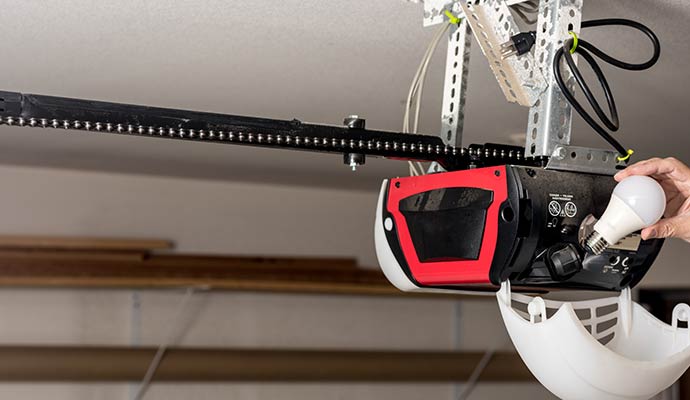
The opener’s light socket is located just inches from its internal antenna and wireless receiver. Drop in the wrong bulb, and you’ve essentially placed a radio jammer right next to your opener’s brain.
The Biggest Offender: Standard LED Bulbs
Not all LED bulbs are created equal. Standard “smart” or “dimmable” LED bulbs — especially cheap, unbranded ones — are notorious for producing high levels of EMI. The electronic driver circuits that regulate LED brightness are the culprit.
Symptoms of LED bulb interference include:
- Your remote only works when you’re very close to the opener (within a few feet instead of the full driveway range)
- The opener works fine while the light is off, but becomes unreliable while it’s on
- Your smartphone app disconnects or lags when the garage light is illuminated
- The wall-mounted keypad or remote requires multiple button presses to get a response
What Bulb Should You Actually Use?
- The fix is straightforward: Use a bulb specifically designed or rated for garage door openers.
- Opener-rated LED bulbs: Are engineered with shielded driver circuits that dramatically reduce EMI output. Chamberlain, LiftMaster, and Genie all manufacture their own branded LED bulbs designed to work with their openers without causing interference. They look identical to a standard A19 bulb and screw in the same way — the difference is all on the inside.
- Incandescent bulbs: Produce virtually zero EMI and remain a perfectly valid option. They’re less energy-efficient, but if you’re experiencing persistent interference issues, swapping to a 60W incandescent is the fastest way to rule out the bulb as the cause.
- What to avoid: Standard retail LED bulbs (even name brands), CFL (compact fluorescent) bulbs, dimmable LEDs, and any “smart” bulb that has its own wireless radio — which is essentially a second Wi-Fi or Bluetooth transmitter fighting for airspace inside your opener.
Beyond the Bulb: Other Sources of Wireless Interference Near Your Opener
Light bulbs aren’t the only culprit. Your garage is often a dense cluster of electrical equipment, and proximity to certain devices can compound the problem significantly.
- LED Shop Lights and Strip Lighting: Many homeowners upgrade their garage with LED shop lights or strip lights mounted near or on the ceiling — right next to the opener’s antenna wire. These fixtures, especially budget models, can emit significant EMI across the same frequency bands your opener uses. If possible, keep LED strip lights and shop fixtures at least 3–5 feet away from the opener unit, or switch to commercial-grade, shielded fixtures.
- Wi-Fi Routers and Extenders: If your router or a Wi-Fi extender is mounted in or near the garage, it can create channel congestion that degrades your opener’s own Wi-Fi module. Most openers use the 2.4 GHz band — the same band that’s already crowded with microwaves, baby monitors, and neighboring networks. If you’ve placed a Wi-Fi extender in the garage to boost signal, try changing your router’s 2.4 GHz channel (channels 1, 6, or 11 are recommended as non-overlapping) or switch the extender to 5 GHz-only.
- EV Chargers and High-Draw Appliances: Electric vehicle chargers, refrigerators, freezers, and air compressors generate significant electrical noise on the power lines. This “line noise” can affect your opener’s performance, especially if the opener is on the same circuit. If your opener shares a circuit with a Level 2 EV charger, consider having an electrician run a dedicated circuit for the opener — a simple but effective fix.
- Security Cameras and Smart Doorbells: Wi-Fi security cameras mounted in the garage or on the exterior near the opener can cause congestion. Each camera is a wireless client constantly streaming data. Multiple cameras on the same band can saturate the channel and cause your opener’s connection to drop. Cameras that use 5 GHz Wi-Fi are significantly less likely to interfere with your opener.

Troubleshooting Checklist: Is Interference the Culprit?
If your garage door opener’s wireless performance has degraded, work through this checklist before assuming the opener itself is faulty:
- Replace the bulb first: Swap your current bulb for an opener-rated LED or a standard incandescent. Test the remote range with the light on and off.
- Check proximity: Look at what’s within 5 feet of the opener: LED shop lights, smart bulbs, Wi-Fi extenders, or cameras. Try temporarily unplugging them one at a time to isolate the source.
- Inspect the antenna wire: The antenna wire hanging from your opener should hang straight down and not be coiled, kinked, or tucked up against the unit. A properly positioned antenna can dramatically improve range.
- Move your Wi-Fi extender: If you have a range extender in the garage, move it closer to the house entry door and away from the opener.
- Call a technician: If you’ve tried all of the above and still have wireless issues, the problem may be inside the opener’s circuit board or receiver module — and a trained technician can diagnose and replace those components quickly.
A Simple Swap With a Big Payoff
It might seem surprising that a $5 light bulb can cripple a $300 smart opener, but electromagnetic interference is a real and surprisingly common problem. The good news is that the fix is usually fast, inexpensive, and something any homeowner can handle.
If you’re unsure which replacement bulb is compatible with your specific opener model, or if you’ve swapped the bulb and are still having wireless issues, don’t hesitate to give us a call. Our technicians carry opener-rated bulbs on every truck, and diagnosing interference problems is all part of a standard service visit.
A properly functioning opener should respond the moment you press the button — from the end of your driveway, every single time. Don’t settle for less
904-584-4828







Garage Door Problems?
We turn "Uh-Oh" into
"ALL GOOD"
Is your garage door acting up? Don't worry, we've got you covered! Our expert technicians are here to diagnose and fix any garage door issues you may be experiencing. From broken springs to malfunctioning openers, the most likable techs you will ever meet will handle it all with precision and care.
Service Area

- Atlantic Beach
- Bartram Park
- Doctors Inlet
- Eagle Harbor
- Elkton
- Fleming Island
- Fleming Island Plantation
- Fruit Cove
- Green Cove Springs
- Hastings
- Jacksonville
- Jacksonville Beach
- Julington Creek Plantation
- Keystone Heights
- Lake Geneva
- Middleburg
- Neptune Beach
- Nocatee
- Oakleaf Plantation
- Orange Park
- Palm Coast
- Penney Farms
- Ponte Vedra
- Ponte Vedra Beach
- River Town
- Saint Augustine
- Saint Johns
- Sawgrass
- World Golf Village
